Two Paths From Idea to App: Google's Agentic Stack vs. My JAMstack
A meetup on Gemini 3.7 Flash and Google Antigravity got me comparing GCP's agent-native path to production against my React + Netlify + Supabase stack.
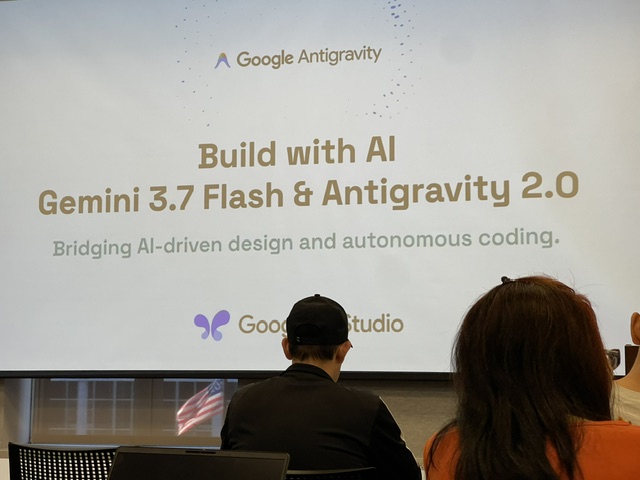
I spent an evening this month at the Agentic AI Meetup at Microsoft’s Chicago office, where Joel Vasallo (Google Developer Expert, GDG Chicago) walked through Gemini 3.7 Flash and Google Antigravity 2.0 — Google’s pitch for bridging AI-driven design and autonomous coding into one workflow. The tagline on the slide was “come with idea, leave with app,” and for most of the demo, it delivered on that.
I write about JAMstack a lot, because it’s the stack I reach for by default: React, Netlify, Supabase, Git. Watching someone build and deploy a working app without leaving a browser tab was a useful prompt to hold that default up against Google’s answer to the same problem and be honest about where each one actually wins.
Two Different Front Doors
The GCP path demoed at the meetup was built around interop between a small set of first-party tools. Google AI Studio is the primary interface — you describe what you want, and it can call out to Stitch to generate UI and design systems. Stitch’s output gets consumed back into the build via MCP, and for anything past a simple prototype, Antigravity takes over as the more capable, downloadable agent for autonomous coding on bigger builds. Deployment happens from inside that same environment — describe it, watch it get designed, watch it get built, click deploy.
My path starts somewhere else entirely: a local editor, a Git repository, and a deploy pipeline. React for the interface, Supabase for data and auth, Netlify for hosting — the stack I laid out in the JAMstack post. The deploy step at the end is also one click, or one git push, but everything before that click happens in tools I already had installed, not inside a single vendor’s console.
Both paths end at a public URL. They get there very differently.
Where GCP Actually Wins
The strongest part of the GCP demo wasn’t the code generation — every agentic tool can generate code now. It was the fact that a non-engineer could plausibly run the whole loop themselves. Design, build, and deploy all live inside AI Studio, connected through Google’s own MCP servers, under a Google Cloud identity that’s usually already tied to an org’s Workspace account. There’s no separate GitHub account to provision, no Netlify team to invite someone into, no explanation of what a build step is. For a business stakeholder who wants to see an idea as a real, shareable app by the end of a meeting, that matters more than architecture purity.
That same integration is also the enterprise story. When everything runs under one Google Cloud org, IAM, audit logging, and access controls apply by default rather than as something you bolt on per-tool. That’s a real advantage over stitching together three separate vendors, each with its own auth model, each requiring its own governance decision.
Where Netlify Holds Its Own
One point of disagreement I noted from the room: a presenter suggested Netlify isn’t easy to share compared to the GCP flow. I don’t think that holds up. git push to a connected repo, or a drag-and-drop deploy, produces a public URL in about the same amount of time as clicking “deploy” inside AI Studio. Netlify’s entire pitch for over a decade has been removing friction from that exact step. On raw “click a button, get a URL,” the two are on par.
The difference isn’t deploy speed. It’s what surrounds the deploy.
The Friction GCP Hasn’t Solved
Two things stood out from the demo that the JAMstack path already handles by default.
MCP server trust. The demo connected AI Studio, Stitch, and Antigravity through MCP servers without ever distinguishing a Google-vetted server from a community-built one, and without a moment spent on what an MCP server is actually allowed to do once it’s connected. “Always allow” was the default answer to every permission prompt, offered without the context needed to decide if that was safe. That’s a real gap — MCP is a wide-open protocol, and a Google-branded interface doesn’t make a third-party server trustworthy by association.
Distribution and version control. Nothing in the GCP flow shown at the meetup produces a commit history, a diff, or a reviewable pull request. The app gets built and deployed, but there’s no artifact of how it changed over time or who approved what. Git solves this by default, and it’s the piece the GCP demo didn’t really have an answer for.
Git does carry a higher entry bar than clicking through a console — that’s a fair trade-off to name honestly. But that bar is exactly the kind of friction a well-scoped, properly guardrailed agent is good at absorbing. git init, a commit, a PR description, a merge — an agent can drive all of it without the human needing to understand rebasing to get the benefit of having a real audit trail. My own deploy step already works this way: Claude Code opens a PR, and merging it triggers the Netlify build — same one-click feel as the AI Studio flow, but with a commit log underneath it that GCP’s demo didn’t show.
Free Tier, Side by Side
Both ecosystems are happy to let you build for free until you have real traffic. The shapes of “free” are different enough to matter when you’re deciding where a proof of concept should live.
| Google Cloud (Firebase + Cloud Run) | Netlify + Supabase | |
|---|---|---|
| Frontend hosting | Firebase Hosting — free global CDN, no credit card | Netlify Free — 300 credits/mo (bandwidth ~20 credits/GB, ~20 production deploys/mo at 15 credits each) |
| Compute | Cloud Run — 2M requests/mo always free, scales to zero | Netlify Functions — 10 credits/GB-hour, 10s execution timeout |
| Database | Firestore — 1 GiB storage, 50K reads/day | Supabase Postgres — 500 MB database, up to 2 active projects |
| Auth | Firebase Auth — 50,000 monthly active users | Supabase Auth — 50,000 monthly active users |
| Storage / egress | Included in Spark plan quotas | 1 GB file storage, 5 GB egress/mo |
| Idle behavior | Cloud Run scales to zero between requests, no pause | Projects pause after 7 days with no API requests |
| Model access included | Gemini Flash via AI Studio — free, rate-limited (~1,000 requests/day) | Not included — bring your own model API |
| Credit card required | No | No |
Free-tier terms move fast on both sides — Netlify moved to credit-based pricing in 2026, and Google removed Gemini Pro from AI Studio’s free tier the same year. Check the vendors’ pricing pages before planning a real budget around these numbers.
The practical read: Google’s free tier is more generous on raw compute and comes with model access baked in. Supabase and Netlify’s free tier is tighter and pauses on inactivity, but it’s also fully portable — Postgres and static assets aren’t locked to one cloud, which is the argument I made in the JAMstack post about avoiding a rewrite later.
The Honest Takeaway
Neither of these is “the right way” to go from idea to app. GCP’s agentic stack is the better on-ramp for someone who isn’t an engineer and needs to hand off a working proof of concept inside an org that already lives in Google Cloud — the integration and the built-in enterprise controls are doing real work there. My JAMstack path asks a little more of the person building it, but it gives you back a Git history, a portable data layer, and a deploy pipeline you can move to another vendor without starting over.
The gap between them is closing, not because Netlify is getting harder to use, but because agents are getting good enough to drive the tools that used to require the technical bar in the first place. The interesting question isn’t which platform wins. It’s how much of that remaining friction — Git included — an agent can responsibly absorb before the two paths stop being meaningfully different at all.